Key takeaways
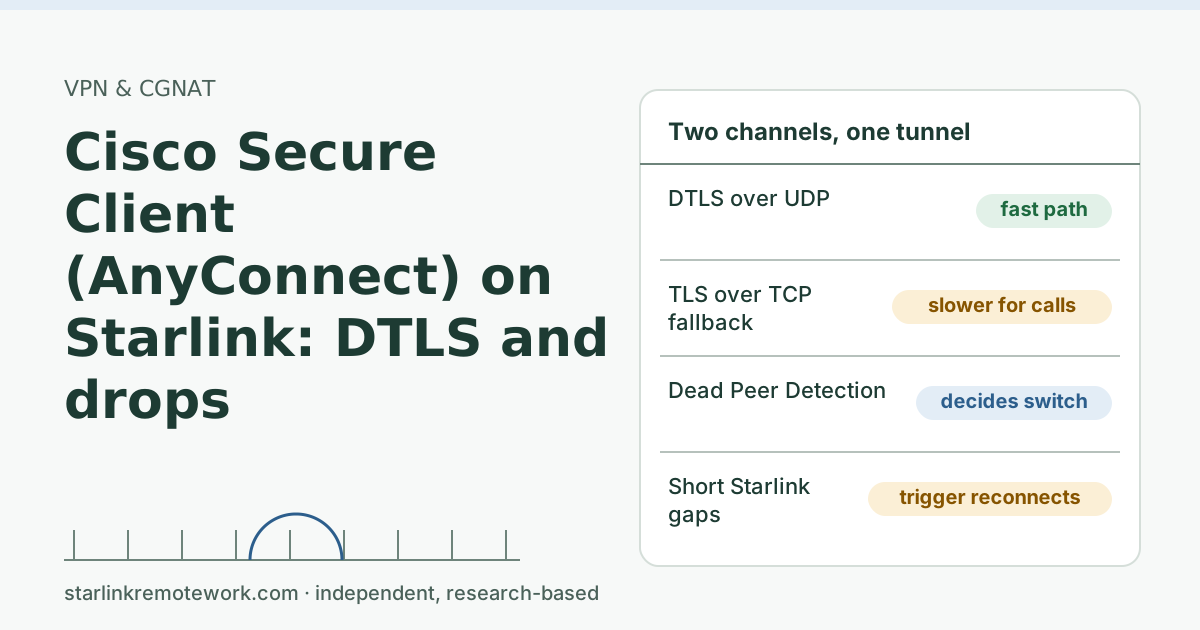
- Cisco Secure Client (formerly AnyConnect) prefers DTLS over UDP for performance and can fall back to TLS over TCP. Cisco says DTLS fallback to TLS requires Dead Peer Detection to be enabled.
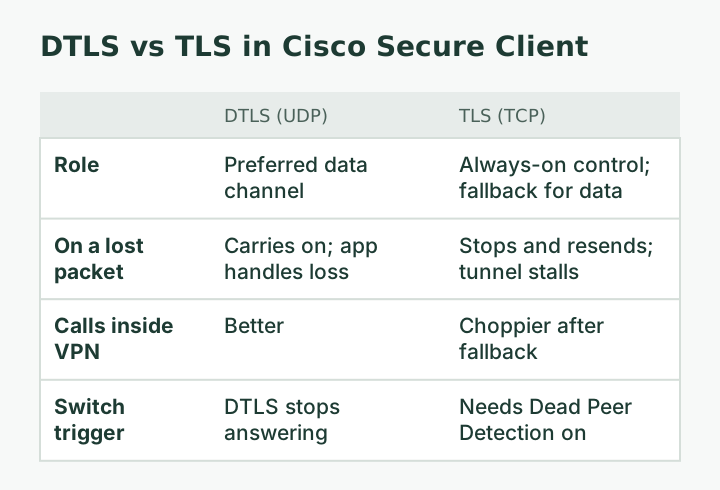
- On TLS, calls inside the VPN usually feel worse, because real-time traffic now rides on TCP. If calls get choppy after a reconnect, ask IT whether you fell back to TLS.
- Cisco documents a default DPD interval of 30 seconds, client keepalives configurable from 15 to 600 seconds, and a fixed 5-minute inactivity timeout for idle SSL/DTLS tunnels on the ASA.
- Behind Starlink’s CGNAT the client connects outward, which works. Starlink says SSL-based VPNs typically cross CGNAT best.
- Starlink can’t troubleshoot VPNs. Give IT drop times, the Starlink app’s outage times and your connection type.
On this page
- Two channels: DTLS and TLS
- What happens during a short gap
- A worked example with Cisco’s defaults
- Why this shows up more on Starlink
- What you can check yourself
- What to send IT
- Calls inside the VPN
- Common mistakes
- When Starlink is the wrong line for this job
- What we don’t know
- What to do next
- Questions people ask
- Sources
Cisco Secure Client (the VPN still widely called AnyConnect) generally works on Starlink, because it connects outward to your company’s firewall and Starlink’s CGNAT allows outbound connections. Most complaints come from how the client handles short gaps: it runs a fast UDP channel (DTLS) and a TCP channel (TLS), and when DTLS stalls it reconnects or falls back to TLS, which makes calls inside the VPN feel worse. The settings that govern this (Dead Peer Detection, keepalives, MTU, split tunneling) belong to your IT team, so the most useful thing you can do is give them good evidence.
Two channels: DTLS and TLS
When the client connects, it sets up a TLS session over TCP and, if allowed, a DTLS session over UDP. Cisco’s ASA configuration guide explains why the UDP channel exists: “DTLS avoids latency and bandwidth problems associated with SSL connections and improves the performance of real-time applications that are sensitive to packet delays.”
The reason is how each transport handles a lost packet. TCP stops and resends; everything behind the lost packet waits. For a web page that is fine. For a voice call carried inside the tunnel, it means the tunnel itself stalls, and the call’s own loss handling can’t do its job. UDP just carries on, which is what real-time audio wants.
So the healthy state on any line, Starlink included, is DTLS up and carrying traffic, with TLS standing by.
What happens during a short gap
A Starlink line can have brief interruptions: an obstructed moment, a satellite hand-off, a full upload. Here is what the client and firewall do, using the settings Cisco documents:
- Dead Peer Detection (DPD) checks whether the other end is still there. Cisco documents a gateway-side DPD interval “from 30 (default) to 3600 seconds,” and a client-side default of 30 seconds, adding that “A value of 30 seconds is recommended.”
- Fallback needs DPD. Cisco states: “In order for DTLS to fall back to a TLS connection, Dead Peer Detection (DPD) must be enabled.” If DTLS stops answering and DPD notices, traffic moves to TLS.
- Keepalives keep NAT and firewall paths from going idle. Cisco says keepalives are enabled by default and can be set “in the range of 15 to 600 seconds.”
- Idle tunnels close. The ASA has “a hardcoded 5-minute TCP inactivity timeout that automatically closes SSL/DTLS tunnel connections when no data or keepalive packets flow for exactly 5 minutes.”
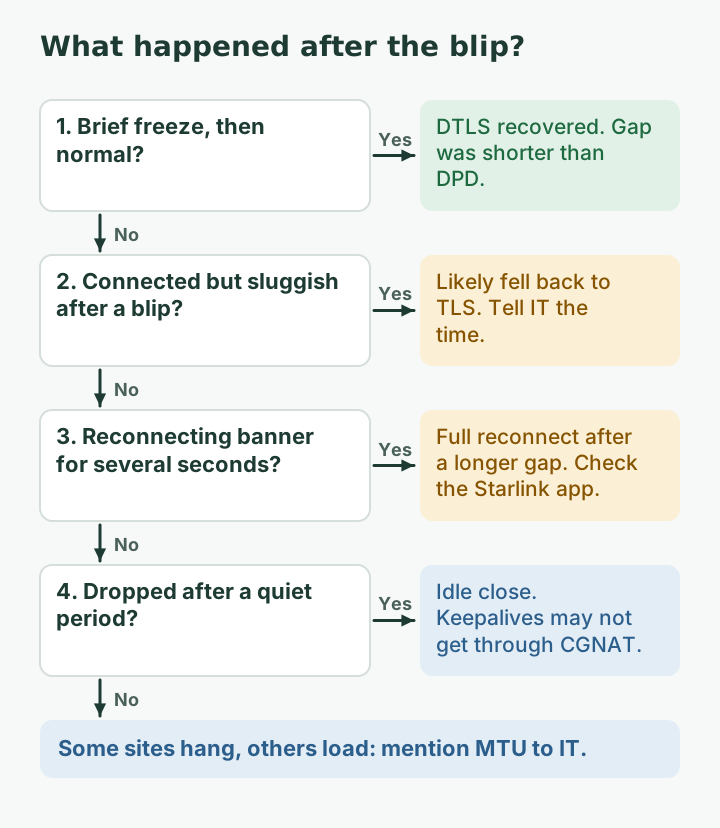
Put together: a gap of a few seconds usually passes without the client noticing. A gap long enough to miss DPD checks can push you to TLS or into a full reconnect. A quiet stretch where keepalives don’t get through can close the tunnel. Behind carrier-grade NAT, where an idle UDP mapping can be forgotten, keepalives matter more than on a simple home line.
| What you notice | Likely state | Likely cause |
|---|---|---|
| Brief freeze, then normal | DTLS recovered | Short gap shorter than DPD |
| Connected, but calls and remote desktop feel sluggish after a blip | Fell back to TLS | DTLS stalled; DPD moved traffic to TLS |
| “Reconnecting” banner for several seconds | Full reconnect | Longer gap or missed DPD checks |
| Disconnected after a quiet period | Tunnel idle-closed | Keepalives not reaching the firewall |
| Some sites load, others hang forever | Possible MTU issue | Large packets not fitting the tunnel |
A worked example with Cisco’s defaults
Take the documented defaults: DPD checks every 30 seconds, keepalives somewhere between 15 and 600 seconds as IT chooses, and the 5-minute idle close on the ASA. A 4-second dish-side gap usually falls between DPD checks, so the tunnel never notices; your call freezes briefly and recovers. A gap that spans missed DPD checks can push traffic to TLS, and from then on calls inside the tunnel feel worse until the client re-establishes DTLS. A lunch break with the laptop idle is where keepalives earn their keep: if they reach the firewall, the tunnel stays up; if a NAT along the way forgot the path, the tunnel closes and you reconnect when you return. Three different outcomes, three different fixes.
Why this shows up more on Starlink
Starlink’s guidance on VPNs: Starlink says VPNs over TCP or UDP work; the VPN must support NAT traversal; SSL-based VPNs typically traverse CGNAT best. Cisco Secure Client is SSL/TLS-based with DTLS, so it is the kind Starlink says crosses CGNAT well. What Starlink adds is the CGNAT layer and occasional short gaps:
- By default, Starlink IPv4 uses carrier-grade NAT (CGNAT) with private addresses from 100.64.0.0/10. An idle UDP mapping at the provider can expire, which is one more reason keepalives matter.
- Starlink says hitting the session limit can drop VoIP calls, freeze video meetings and cause gaming/VPN issues.
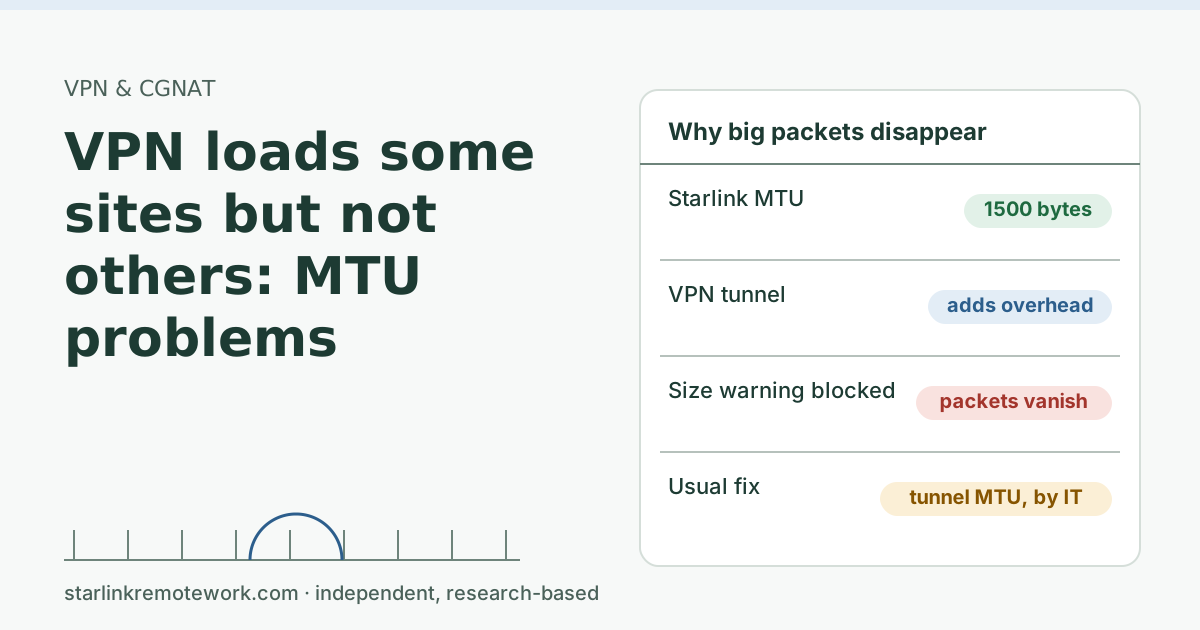
- 1,500 bytes is what Starlink provides, the standard size, so MTU trouble usually comes from somewhere else in the path.
Starlink doesn’t publish its CGNAT timeouts, so nobody outside Starlink can tell you the exact keepalive value that is “enough.”
What you can check yourself
- Cable the laptop. Remove Wi-Fi from the list of suspects.
- Turn off any other VPN (personal VPN apps, browser VPN extensions).
- Log each drop: time, how long, what you were doing, and whether the Starlink app shows an outage at that minute. The Starlink app's Statistics page shows speed, uptime, latency, outages and alerts (when on the Starlink router).
- Look at the client’s statistics after a blip. Secure Client shows connection details; if your copy lets you see whether DTLS or TLS is in use, note it.
- Don’t restart the dish mid-day to fix the VPN.
What to send IT
- Three or more drop times with durations, and the matching Starlink app outage entries (or “none”).
- Whether you were on a cable or Wi-Fi.
- Your connection: Starlink Residential, IPv4 behind CGNAT (router outside address in 100.64.0.0/10, see the 100.64 test), with native IPv6.
- Whether calls get worse after a reconnect (a hint that you fell back to TLS).
- Any “some sites hang” pattern, which suggests MTU.
- Logs in whatever form IT asks for. Cisco provides a diagnostic tool for the client; your IT team will tell you how they want it run.
IT Details for your IT person
From Cisco’s ASA 9.22 AnyConnect chapter: DTLS fallback to TLS requires DPD; gateway DPD 30 s default (30–3600), client DPD 30 s recommended; client keepalive enabled by default, 15–600 s; hardcoded 5-minute inactivity timeout closes idle SSL/DTLS tunnels; tunnel MTU auto-derived from interface MTU minus IP/UDP/DTLS overhead, manual range 576–1406.
Starlink Residential: CGNAT on 100.64.0.0/10, inbound blocked, CGNAT timeouts unpublished, a standard 1,500 bytes path MTU per Starlink, native IPv6 with a delegated prefix (56 prefix-length). Consider shorter keepalives for users behind CGNAT, confirm DTLS is permitted end to end, and evaluate split tunneling for Teams/Zoom media per Microsoft’s guidance ("VPNs are typically not designed or configured to support real-time media").
Calls inside the VPN
If your Teams or Zoom calls run through Secure Client, they inherit every tunnel hiccup, and on TLS fallback they ride on TCP. Microsoft recommends a split-tunnel path for Teams traffic that “bypasses the virtual private network,” noting that VPNs may not support UDP and that traffic “might be routed to a service front door location that is further away from the end user, introducing extra latency and jitter.” Whether your company allows it is a security decision, but it is the single change most likely to improve calls for a remote worker on any line.
Common mistakes
- Asking Starlink to fix it. Starlink says it cannot troubleshoot VPN connection issues and the Starlink app may not work properly with a VPN on.
- Expecting a public IP to solve it. Switching to a Public IP may help an incompatible VPN, but Starlink does not guarantee VPN compatibility even then.
- Changing your laptop’s MTU by hand. On a managed laptop that can break other things; leave it to IT.
- Treating every drop the same. A fallback, a reconnect and an idle close have different causes and fixes.
When Starlink is the wrong line for this job
If you spend the day in remote desktop sessions or on calls inside the VPN, and your company can’t split call traffic or tune the client, short satellite gaps will keep showing up as reconnects. Fiber or cable as the main line is the better choice where it exists, with satellite or cellular as the backup. If you must use Starlink, a backup line through a dual-WAN router shortens outages, though the VPN will still reconnect when lines switch.
What we don’t know
We haven’t tested Secure Client on a Starlink line. Cisco’s numbers above come from the ASA configuration guide; your company may run a different firewall or version with different defaults. Starlink doesn’t publish CGNAT timers. The Work-Day Reliability Report will count outages over 5 and 60 seconds during work hours on one logged connection once it has data, which maps roughly onto “survives DPD” and “forces a reconnect.”
What to do next
- Log three drops and match them to the table above.
- Read our VPN guide for how CGNAT affects each VPN type, and the CGNAT and public IP guide for what a shared address does and doesn’t block.
- For call quality outside the VPN question, see Zoom and Teams calls on Starlink.
- If drops come at a regular interval, read VPN drops about once an hour.
- Using a different client? See GlobalProtect on Starlink or FortiClient on Starlink.
Questions people ask
Does Cisco AnyConnect work on Starlink?
Generally yes. Cisco Secure Client connects outward to your company’s firewall over TLS and DTLS, which works behind CGNAT. Drops usually come from short connection gaps, DTLS falling back to TLS, or timer settings.
What is DTLS in AnyConnect?
DTLS is the UDP version of TLS. Cisco says it avoids latency and bandwidth problems associated with SSL connections and improves performance for real-time applications. AnyConnect uses it alongside a TLS channel.
Why does AnyConnect fall back to TLS?
If the DTLS channel stops working (for example UDP is blocked or a short outage confuses it), the client can carry traffic over the TLS channel instead. Cisco notes Dead Peer Detection must be enabled for that fallback to happen.
Why are my Teams calls bad over AnyConnect on Starlink?
Calls inside a VPN take a longer path, and if the client fell back to TLS they ride on TCP, which handles loss poorly for real-time audio. Ask IT about split tunneling for Teams and Zoom media.
Should I lower the MTU for AnyConnect on Starlink?
Not on your own. Cisco says the tunnel MTU is set automatically from the interface MTU minus overhead, and admins can set it manually. Starlink provides a standard 1,500 bytes MTU. If some sites load and others hang, mention MTU to IT.
Can I change AnyConnect keepalive settings myself?
No. Keepalive, Dead Peer Detection and tunnel settings are configured by your company on its firewall or profile. You can supply the evidence that helps them choose.
Sources
- Does Starlink work with VPNs? (Starlink support), checked Oct 5, 2026
- What IP address does Starlink provide? (Starlink support), checked Oct 5, 2026
- What are CGNAT session limits and how do they affect my connection? (Starlink support), checked Oct 5, 2026
- What is the MTU size support for Starlink? (Starlink support), checked Oct 5, 2026
- How can I monitor my Starlink's performance? (Starlink support), checked Oct 5, 2026
- Cisco: ASA 9.22 VPN configuration guide, AnyConnect VPN client connections (DTLS, DPD, keepalive, MTU), retrieved Oct 6, 2026
- Microsoft Learn: Prepare your organization's network for Teams (split-tunnel VPN), retrieved Oct 6, 2026
Research-based: written from vendor documentation, Starlink support pages and standards, not from our own measurements. Starlink rules and prices on this page come from our dated fact file and show the day they were checked; they change, so confirm before you rely on one.Links to Starlink’s plan pages here use the site owner’s own referral link; the owner may get a referral reward and your price is the same. No affiliate links (how we make money). General information, not professional IT, legal or medical advice. Independent · not affiliated with SpaceX or Starlink. Spotted an error? Tell us.