Key takeaways
- Starlink’s CGNAT drops plain IPsec packets (protocol 50). FortiClient IPsec works on Starlink only when the tunnel is wrapped in UDP (NAT traversal) or carried over TCP.
- Fortinet replaced SSL VPN tunnel mode with IPsec VPN in FortiOS 7.6.3, on all FortiGate models, with the option to run IPsec over TCP port 443. If your company upgraded, your tunnel type changed.
- A tunnel that connects but then stalls is often a path that went idle behind NAT. IPsec NAT keepalives exist for exactly that; the IETF default is one every 20 seconds.
- Rule out Wi-Fi and a second VPN yourself, then send IT drop times, matching Starlink outage times and your connection type.
On this page
- The CGNAT rule that matters for FortiClient
- The FortiOS 7.6.3 change
- “Connected, but nothing loads”: the usual reasons
- Your ten-minute checklist
- Reading the hotspot test
- Edge cases
- A ticket template IT can act on
- Common mistakes
- Calls inside the tunnel
- When Starlink is the wrong line for this job
- What we don’t know
- What to do next
- Questions people ask
- Sources
FortiClient generally works on Starlink when the tunnel can cross NAT: IPsec wrapped in UDP (NAT traversal) or carried over TCP, or an SSL-based tunnel. When it connects but stalls, or drops every so often, the usual causes are IPsec packets that CGNAT won’t pass, a tunnel path that went idle and was forgotten, short Starlink gaps, or home Wi-Fi. One big change to know: Fortinet replaced SSL VPN tunnel mode with IPsec VPN in FortiOS 7.6.3, so if your company upgraded, your tunnel type and its NAT behavior changed. Rule out your own side in ten minutes, then give IT the evidence below.
The CGNAT rule that matters for FortiClient
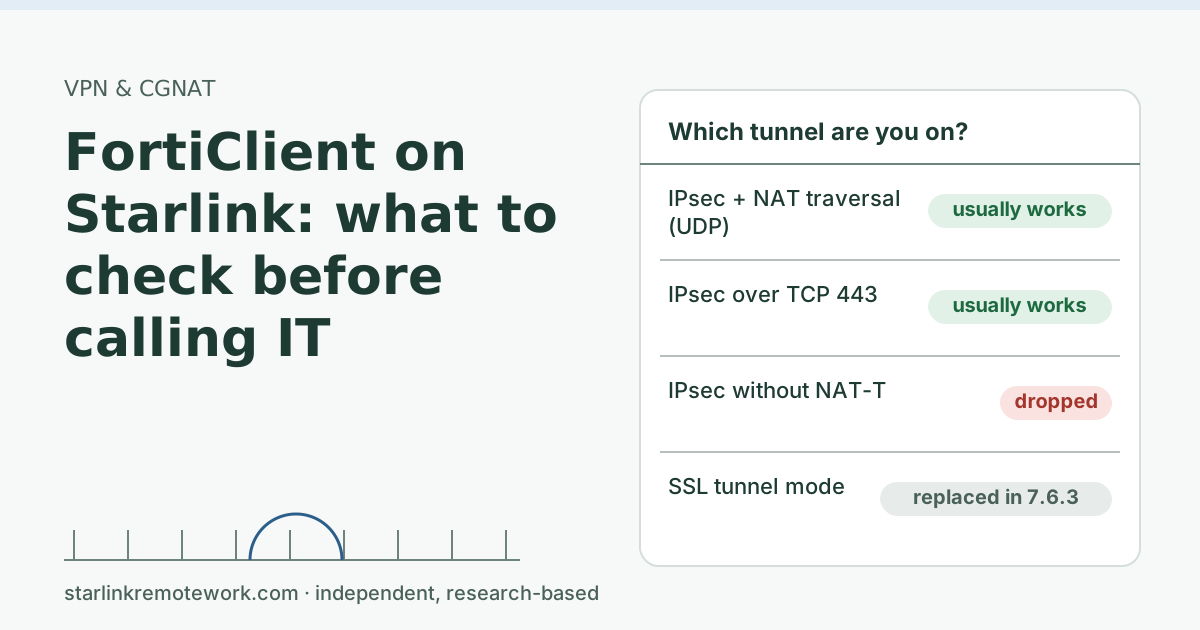
Starlink is direct about what its CGNAT does to VPN traffic: CGNAT drops VPNs relying on IP protocols 47 (GRE), 50 (ESP), 51 (AH) and 115 (L2TP). Plain IPsec carries data in protocol 50 (ESP), so it can’t cross. IPsec still works if ESP is wrapped inside UDP, which is what NAT traversal (NAT-T) does, usually on UDP port 4500. Starlink’s general guidance agrees: Starlink says VPNs over TCP or UDP work; the VPN must support NAT traversal; SSL-based VPNs typically traverse CGNAT best. And it lists what tends to fail: Client VPN protocols Starlink lists as generally not working well with CGNAT: PPTP and L2TP. Also GRE and IPsec without NAT-T for site-to-site.
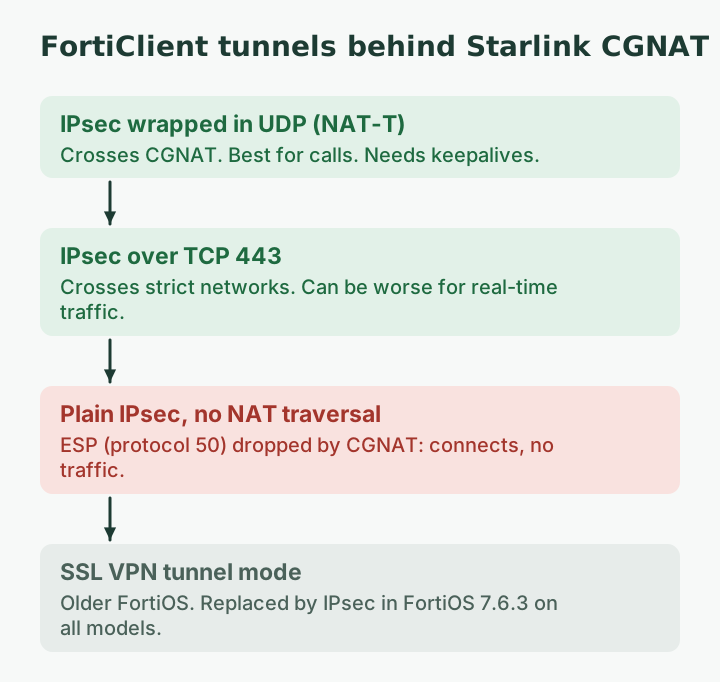
In practice that gives three FortiClient situations:
| Tunnel your company runs | On Starlink | Notes |
|---|---|---|
| IPsec with NAT traversal (UDP) | Usually works | Best for calls; needs keepalives through CGNAT |
| IPsec over TCP (for example TCP 443) | Usually works | Crosses strict networks; can be worse for real-time traffic |
| IPsec without NAT traversal | Fails or connects with no traffic | ESP is dropped by CGNAT |
| SSL VPN tunnel mode (older FortiOS) | Usually works | Replaced by IPsec in FortiOS 7.6.3 |
The FortiOS 7.6.3 change
Fortinet’s FortiOS 7.6.3 release notes carry a special notice for all FortiGate models: “the SSL VPN tunnel mode feature is replaced with IPsec VPN, which can be configured to use TCP port 443.” The feature “is no longer available in the GUI and CLI,” and “settings will not be upgraded from previous versions,” so administrators had to migrate configurations before upgrading.
Why you care: if your VPN worked fine on Starlink for months and started misbehaving after your company’s firewall upgrade, the tunnel type may have changed from SSL to IPsec. Depending on how IT set it up, the new IPsec tunnel may use UDP with NAT traversal (good for calls, needs keepalives) or TCP 443 (crosses strict networks, can feel slower on calls). Both can work behind CGNAT; plain IPsec without NAT traversal won’t.
“Connected, but nothing loads”: the usual reasons
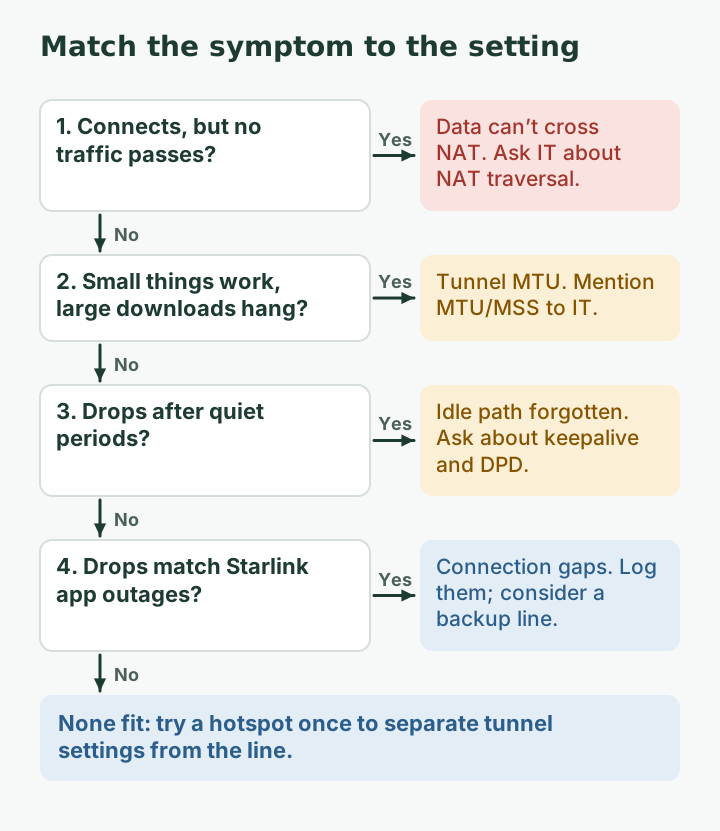
- Data can’t cross NAT. The tunnel negotiates, then ESP is dropped. Typical with NAT traversal off.
- The path went idle. NAT devices forget mappings that carry no traffic. The IETF rules say a UDP mapping must last at least two minutes and recommend five or more, but you have Starlink’s CGNAT plus your own router in the path, and Starlink doesn’t publish its timers. IPsec’s NAT keepalives exist for this: RFC 3948 says their “sole purpose” is “to keep NAT mappings alive,” with a default of one every 20 seconds when nothing else is sent.
- MTU. Tunnels add headers, so large packets may not fit. The symptom is specific: small things work (chat, some sites) and large things hang (file downloads, certain pages). 1,500 bytes is what Starlink provides, so the fix belongs in the tunnel settings, not at Starlink.
- Short Starlink gaps. A brief outage can make the client decide the gateway is gone. Check the Starlink app at the time of a drop: The Starlink app's Statistics page shows speed, uptime, latency, outages and alerts (when on the Starlink router).
Your ten-minute checklist
- Cable the laptop, or sit next to the router.
- Turn off other VPNs and browser VPN extensions.
- Try a second network once, such as a phone hotspot. If FortiClient behaves the same there, the problem is probably the tunnel settings, not Starlink. If it works on the hotspot but not on Starlink, CGNAT or Starlink gaps are in play.
- Note which mode FortiClient shows (IPsec or SSL) in its connection details, if visible.
- Log three drops with time, duration, what you were doing and whether the Starlink app shows an outage then.
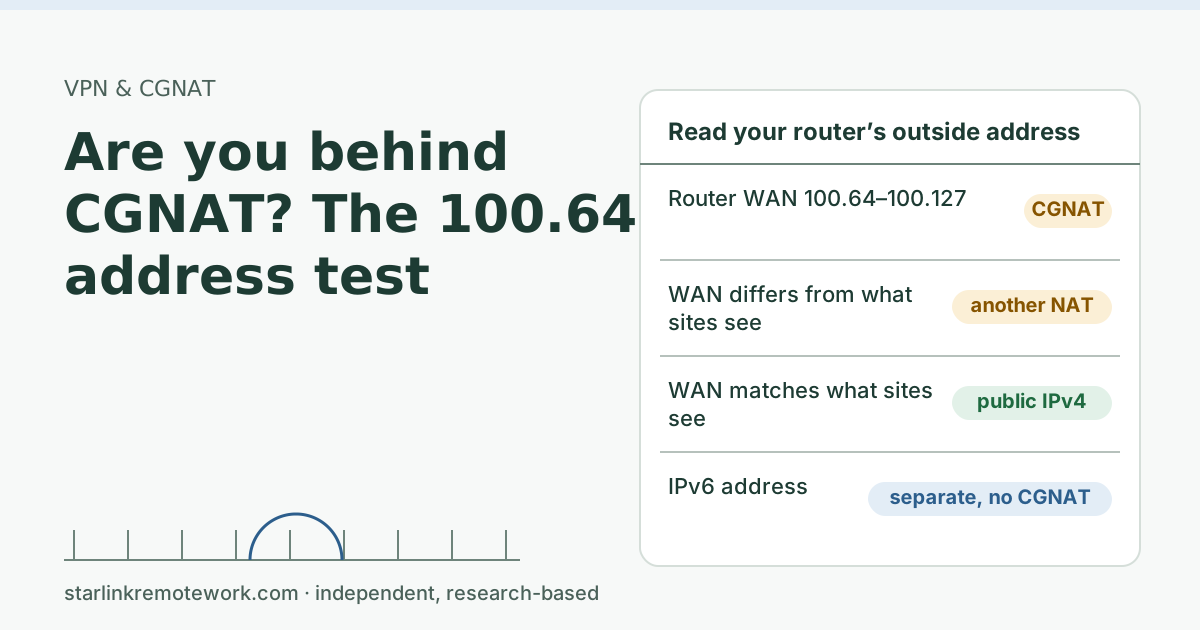
- Check the 100.64 address on your router’s outside so you can tell IT you’re behind CGNAT (how to check).
Reading the hotspot test
The single most useful test in the checklist is step 3: one try on a phone hotspot. It separates the tunnel’s settings from the line.
| FortiClient on Starlink | FortiClient on a phone hotspot | What it suggests |
|---|---|---|
| Fails | Fails | Profile or gateway settings; not Starlink-specific |
| Fails | Works | Something about Starlink’s path: CGNAT handling, keepalives, or gaps |
| Works, then drops at times | Works, then drops at the same times | A timer on the gateway (session or idle limits) |
| Works, then drops at times | Stays up | Starlink gaps or idle mappings; compare with the app’s outage list |
Carrier hotspots are often behind carrier NAT too, so “works on the hotspot” doesn’t prove CGNAT isn’t involved. It does tell IT the tunnel can cross some NATs, which narrows the search to timers and gaps.
Edge cases
- Two FortiClient profiles. Some companies offer an IPsec profile and a fallback profile. If one works on Starlink and the other doesn’t, say so in the ticket; it points straight at NAT traversal.
- FortiClient on a personal computer. Free or unmanaged installs may use different settings from the company’s managed laptops. Test on the managed device.
- Your own router in front of Starlink. A router with an IPsec “passthrough” or VPN helper can interfere. Turn such helpers off for a test, or test plugged straight into the Starlink router.
- IPv6. If your company’s gateway has an IPv6 address and your laptop prefers IPv6, the tunnel may not touch CGNAT at all. Mention that your connection has native IPv6.
A ticket template IT can act on
Subject: FortiClient drops / no traffic on Starlink (CGNAT)
I work on Starlink Residential. My router’s outside IPv4 is in 100.64.0.0/10 (carrier-grade NAT); IPv6 is native. Starlink states CGNAT drops IP protocols 47, 50, 51 and 115.
Symptoms: [connects but no traffic / drops every ~N minutes / large downloads hang]. FortiClient shows [IPsec/SSL]. Times of three incidents: […]. Starlink app outages at those times: [yes/no]. Tested on [cable/Wi-Fi]; no other VPN running. On a phone hotspot the problem [does/does not] happen.
Could you check NAT traversal and keepalive settings for my profile, whether IPsec over TCP 443 is available, and split tunneling for Teams/Zoom?
IT Details for your IT person
Starlink Residential IPv4 is CGNAT on 100.64.0.0/10 with inbound blocked and unpublished mapping timers. ESP must be UDP-encapsulated (NAT-T, RFC 3948; NAT-keepalive default 20 s) or carried over TCP. FortiOS 7.6.3 replaces SSL VPN tunnel mode with IPsec VPN that can use TCP 443 on all models; configurations were not migrated automatically. If clients connect but pass no traffic, verify NAT-T and that UDP 500/4500 are permitted to the gateway; for idle drops, shorten keepalive and DPD intervals; for "small works, large hangs," review tunnel MTU/MSS. Starlink provides a standard path MTU and says it cannot troubleshoot VPNs.
Common mistakes
- Asking Starlink support. Starlink says it cannot troubleshoot VPN connection issues and the Starlink app may not work properly with a VPN on.
- Assuming a public IP is the cure. Switching to a Public IP may help an incompatible VPN, but Starlink does not guarantee VPN compatibility even then. A public IPv4 is optional and only available on Local Priority and Global Priority plans.
- Running a personal VPN and FortiClient together. Routes collide.
- Editing FortiClient settings on a managed laptop. Profiles are usually pushed by IT; local changes get overwritten or break compliance checks.
Calls inside the tunnel
If your calls run through FortiClient, they inherit every reconnect, and on a TCP tunnel they suffer more from loss. Microsoft recommends sending Teams traffic around the VPN (split tunneling) because VPNs “are typically not designed or configured to support real-time media.” Ask IT whether that is allowed; it often makes a bigger difference than any Starlink change. Our Zoom and Teams guide covers the call side.
When Starlink is the wrong line for this job
If your company can’t enable NAT traversal or an equivalent, and requires the VPN for all work, a CGNAT connection will keep fighting you. Ask IT before relying on Starlink as your only line. Fiber or cable is the better primary where available; a backup line covers outages either way.
What we don’t know
We haven’t run FortiClient on a Starlink line, and we didn’t verify FortiGate’s default keepalive or DPD values for this article, so we don’t quote them. Every company’s profile differs. The Work-Day Reliability Report will record outages long enough to break a VPN session on one logged connection once it has data.
What to do next
- Run the ten-minute checklist, then send the ticket template.
- Read our main VPN guide and the CGNAT guide.
- If drops come at a steady interval, see VPN drops about once an hour.
Questions people ask
Does FortiClient VPN work on Starlink?
Generally yes, as long as the tunnel can cross NAT. IPsec needs NAT traversal (UDP encapsulation) or TCP transport; SSL-based tunnels cross NAT easily. Your company’s FortiGate settings decide which you get.
Why does FortiClient connect but no traffic passes on Starlink?
Common causes are an IPsec tunnel whose data packets can’t cross CGNAT (NAT traversal off or blocked), a path that went idle and was forgotten by a NAT device, or an MTU problem where large packets don’t fit the tunnel.
What changed with FortiClient SSL VPN?
Fortinet’s FortiOS 7.6.3 release notes say SSL VPN tunnel mode is replaced with IPsec VPN, which can be configured to use TCP port 443, on all FortiGate models. Settings were not upgraded automatically; admins had to migrate.
Should FortiClient use IPsec over UDP or TCP on Starlink?
UDP (with NAT traversal) is usually better for calls and real-time traffic. TCP 443 helps where UDP is blocked, at some cost for real-time traffic. Your IT team chooses what the gateway offers.
Will Starlink support help with FortiClient?
No. Starlink says it can’t troubleshoot VPN connection issues. Your IT team or Fortinet admin is the right contact.
Does a Starlink public IP fix FortiClient?
It may help a VPN that can’t cross NAT, but Starlink doesn’t guarantee VPN compatibility even with a public IP, and public IPv4 is only offered on Priority plans.
Sources
- Will enterprise site-to-site VPN or SDWAN appliances work on Starlink? (Starlink support), checked Oct 5, 2026
- Does Starlink work with VPNs? (Starlink support), checked Oct 5, 2026
- What is the MTU size support for Starlink? (Starlink support), checked Oct 5, 2026
- How can I monitor my Starlink's performance? (Starlink support), checked Oct 5, 2026
- What IP address does Starlink provide? (Starlink support), checked Oct 5, 2026
- Fortinet: FortiOS 7.6.3 release notes, SSL VPN tunnel mode replaced with IPsec VPN, retrieved Oct 6, 2026
- IETF RFC 3948: UDP Encapsulation of IPsec ESP Packets (NAT-keepalive), retrieved Oct 6, 2026
- IETF RFC 4787: NAT Behavioral Requirements for Unicast UDP (mapping timers), retrieved Oct 6, 2026
Research-based: written from vendor documentation, Starlink support pages and standards, not from our own measurements. Starlink rules and prices on this page come from our dated fact file and show the day they were checked; they change, so confirm before you rely on one.Links to Starlink’s plan pages here use the site owner’s own referral link; the owner may get a referral reward and your price is the same. No affiliate links (how we make money). General information, not professional IT, legal or medical advice. Independent · not affiliated with SpaceX or Starlink. Spotted an error? Tell us.