Key takeaways
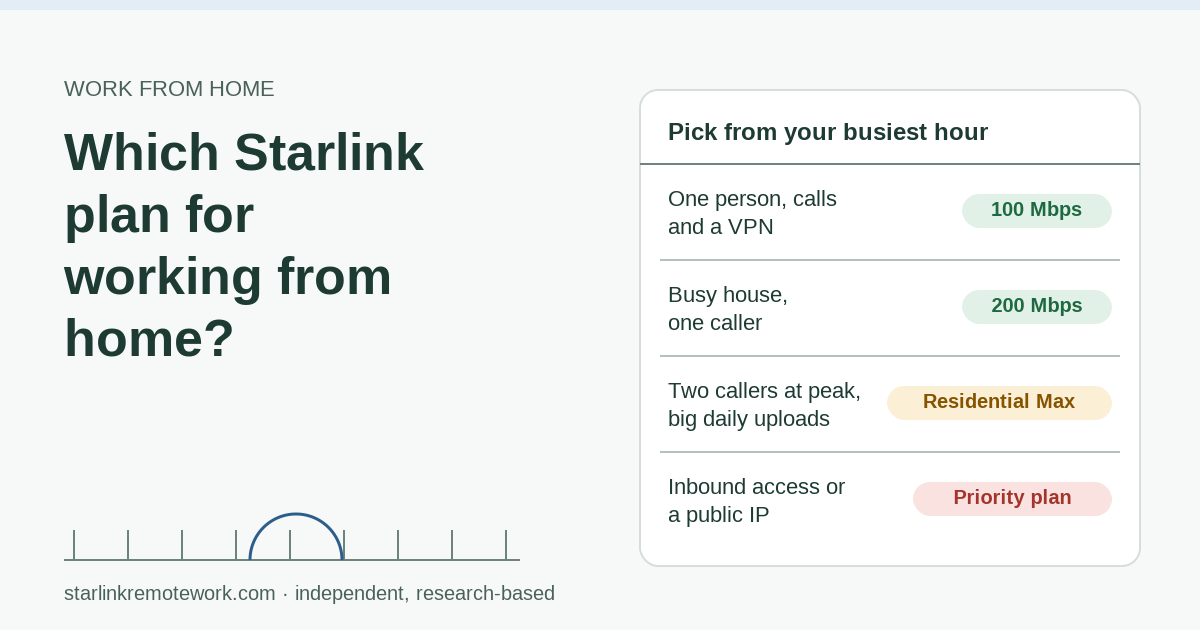
- One person on Zoom or Teams plus a client VPN: Residential 100 Mbps usually carries it. Calls need a few megabits of upload, not hundreds of megabits of download.
- Residential 100 and 200 Mbps list the same upload range. The 200 Mbps plan buys download headroom for a busy house, not better calls.
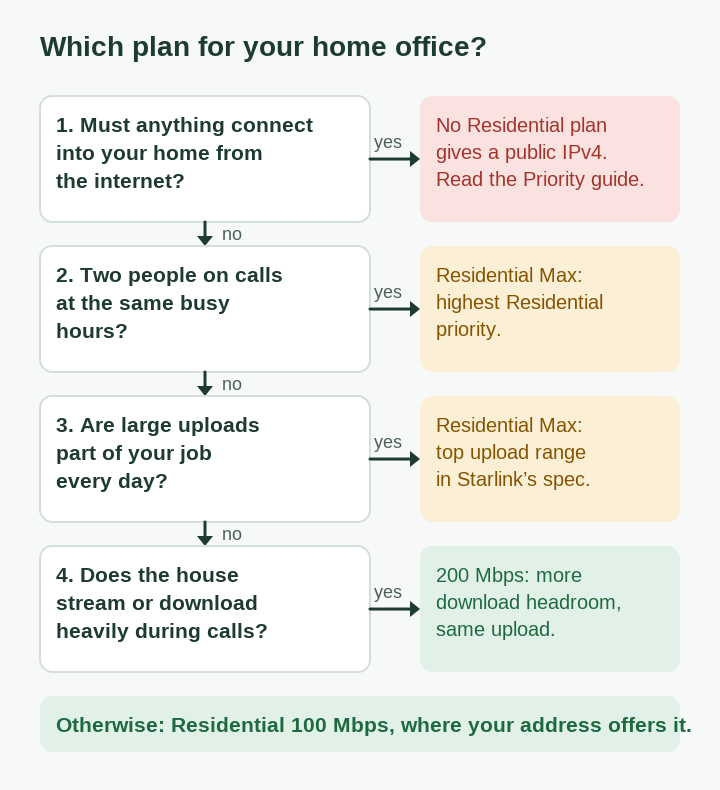
- Pay for Residential Max when two people are on calls at the same busy hours, or uploads are your job. Starlink gives Max the highest Residential priority.
- Since late October 2026 Starlink sets Residential prices by address: $44–$55/mo depending on your address for 100 Mbps, $104–$156/mo depending on your address for Max. Enter your address on starlink.com to see yours.
- No Residential plan gives you a public IP or removes CGNAT. If your work needs inbound connections, read the Priority comparison before you order.
On this page
For one person working from home on video calls and a client VPN, Starlink Residential 100 Mbps is usually enough. Choose Residential Max if two people are on calls at the same busy hours, or if uploading large files is part of your job. The 200 Mbps plan adds download headroom for a busy household; by Starlink’s own spec it doesn’t add upload, which is what calls use.
Since late October 2026 there is no single US price to quote. Starlink sets Residential prices by address, and its own price data shows 100 Mbps at $44–$55/mo depending on your address, 200 Mbps at $68–$85/mo depending on your address and Max at $104–$156/mo depending on your address (checked Nov 16, 2026). The 100 and 200 Mbps plans are offered only in select areas, so your address also decides which of the three you can pick.
One thing comes before any of this: if fiber or cable reaches your address, take it for work and keep satellite as a backup at most. A wired line gives you steadier calls and a simpler VPN setup than any satellite plan.
This guide picks the plan from the work you do, not from the headline download number. It uses Starlink’s plan specs and the call apps’ own bandwidth figures, each dated. None of the numbers are our own measurements.
The three plans side by side, for work
| Plan | Price in Starlink’s data | Starlink’s spec | Fits a home office with |
|---|---|---|---|
| Residential 100 Mbps | $44–$55/mo depending on your address | Residential 100 Mbps: download capped at 100 Mbps, upload up to 15–35 Mbps. | One person on calls and a VPN, light uploads |
| Residential 200 Mbps | $68–$85/mo depending on your address | Residential 200 Mbps: download capped at 200 Mbps, upload up to 15–35 Mbps. | One caller in a house that streams, games or downloads during work hours |
| Residential Max | $104–$156/mo depending on your address | Residential Max: download up to 400+ Mbps, upload up to 20-40 Mbps. | Two people on calls at peak hours, daily large uploads, customer-facing calls all day |
Two lines in that table matter more than the rest. First, the upload range is the same on 100 and 200 Mbps. Second, the plans differ in how they behave when the network is busy: On Residential 100 and 200 Mbps, speeds may be slower at peak hours than on Residential Max. Residential Max is the highest-network-priority Residential plan.
All three include the basics a home office needs. All Residential plans include unlimited data. Residential is for a fixed location: no in-motion use and no roaming away from the service address. If you travel for work, Residential is the wrong plan; that is a Roam question, not a home-office one.
What a work call actually uses
Video calls need far less bandwidth than most people expect. The call apps publish their own figures:
- Zoom: a 1:1 call in 720p uses about 1.2 Mbps each way; a 1:1 call in 1080p sends about 3.8 Mbps; a group call in 720p sends about 2.6 Mbps.
- Microsoft Teams: 1500 kbps recommended for 1:1 video.
- Google Meet: up to 1.7 Mbps each way for 720p video.
Now set those against Starlink’s spec. Even the low end of the upload range on the 100 Mbps plan is several times what one HD call sends. Ookla’s Q1 2026 data put the median US Starlink upload at 21.46 Mbps, a third-party figure across all plans.
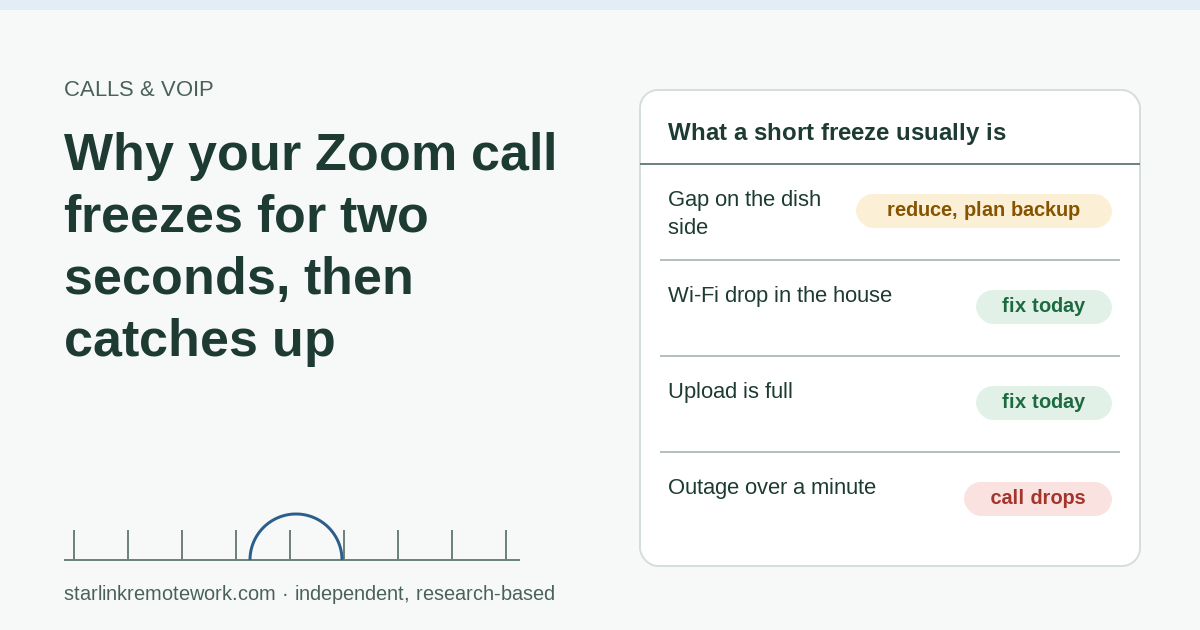
So bandwidth is rarely what ruins a call on Starlink. The short freezes come from brief drops: an obstruction in the dish’s view, a satellite handover, or a busy hour where a lower-priority plan slows down. That is why the choice between plans is really a choice about busy hours, not about speed. Our call freezes guide separates those causes, and Zoom and Teams calls on Starlink covers what calls need in more depth.
When Residential 100 Mbps is enough
The cheapest Residential plan fits most single remote workers. It is a good match when:
- One person is on calls during work hours, and nobody else in the house is uploading at the same time.
- Your VPN is a client VPN that works behind carrier-grade NAT. Starlink lists the types: Client VPN protocols Starlink lists as generally working well with CGNAT: SSTP, OpenVPN, WireGuard. Our VPN guide has the questions to send your IT team.
- Your files live in the cloud and you sync documents, not raw video.
- Your calls are mostly internal. A three-second freeze on a team stand-up is an annoyance, not a lost sale.
If that describes you, start on 100 Mbps where your address offers it. Starlink says you can upgrade a Residential plan at any time, subject to availability, and an upgrade to Max takes effect immediately. A month of real calls at your real busy hour is better evidence than any chart, including ours.
Where 200 Mbps fits
The 200 Mbps plan is a household plan more than a work plan. Pick it when your calls share the line with heavy downloads at the same time: someone streaming in 4K, a game download, a school laptop pulling updates. The extra download headroom keeps the house from crowding the line.
It doesn’t change the call math. Starlink’s spec gives it the same upload range as 100 Mbps, and Starlink groups both tiers together as the ones more likely to slow down at busy times. If the problem you are trying to solve is calls that freeze at 10 a.m., 200 Mbps is not the fix; better placement, Ethernet to the desk, or Max is.
When to pay for Residential Max
Max costs more at every address in Starlink’s data, so it should earn its place. It does in four cases:
- Two people on calls at the same busy hours. Two remote workers, or a remote worker and a student in online classes. The extra priority matters most exactly when both of you need the line. Read two remote workers on one Starlink for the household side.
- Uploads are the job. Video editors, architects pushing CAD files, photographers delivering shoots, anyone whose nightly backup runs into the morning. Residential Max: download up to 400+ Mbps, upload up to 20-40 Mbps. Our uploads and large files page covers scheduling them around calls.
- Customer-facing calls all day. Sales, support, telehealth or tutoring, where a frozen call costs money or trust.
- Your area slows down at busy times. If a lower tier already gives you trouble at the hours you work, Max is the Residential plan Starlink puts first.
Max also comes with different hardware in most markets. Starlink says In most markets Residential Max comes with a Standard Starlink and Router 3 (Wi-Fi 6, tri-band). For a home office, the useful part is wired: 2 ports
What no Residential plan fixes
Some work needs aren’t about the plan tier at all. Every Residential plan shares these limits:
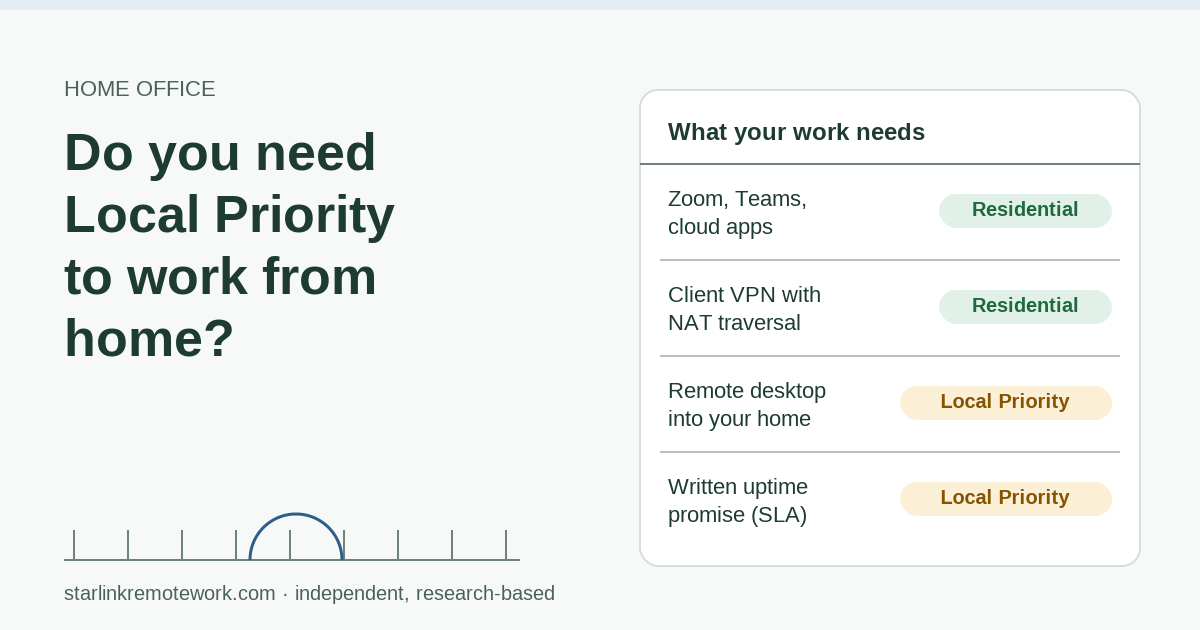
- No public IPv4. The default CGNAT policy blocks all inbound connections (no inbound ports). If you run remote desktop into a home PC, host a client portal, or your company uses a site-to-site VPN, you need a tunnel, IPv6, or a Priority plan. See CGNAT, public IP and port forwarding.
- A session cap. Residential lines are limited to 1,200 sessions at once. Starlink says hitting the session limit can drop VoIP calls, freeze video meetings and cause gaming/VPN issues. Starlink recommends heavy VoIP/video users consider a Priority plan, which has a public IP and no CGNAT session limit.
- No backup. One line is one point of failure on every plan. The Failover Builder puts a second line, a dual-WAN router and a UPS together with dated prices.
If the first two bullets describe your job, read Residential vs Local Priority for a home office before you order.
How to see the price at your address
Starlink no longer shows a Residential price until you enter an address. Here is what to check on the order page, in order:
- Which plans appear. If 100 or 200 Mbps is missing, it isn’t offered at that address.
- The monthly price for each plan. It is set by address, inside the ranges above.
- Kit: buy or rent. The Standard kit is $349 to buy where purchase is offered; rental terms show at checkout.
- One-time charges. Shipping, any activation charge and, in busy areas, any one-time surcharge appear as their own lines before you pay.
- Any new-customer discount. Starlink’s US site text, as reported in early November 2026, says new customers can save 30% on recurring Residential service in select areas when they sign up by November 30, 2026. It shows only at checkout for an eligible address. We can’t tell you whether yours qualifies, and after November 30 that text may no longer apply.
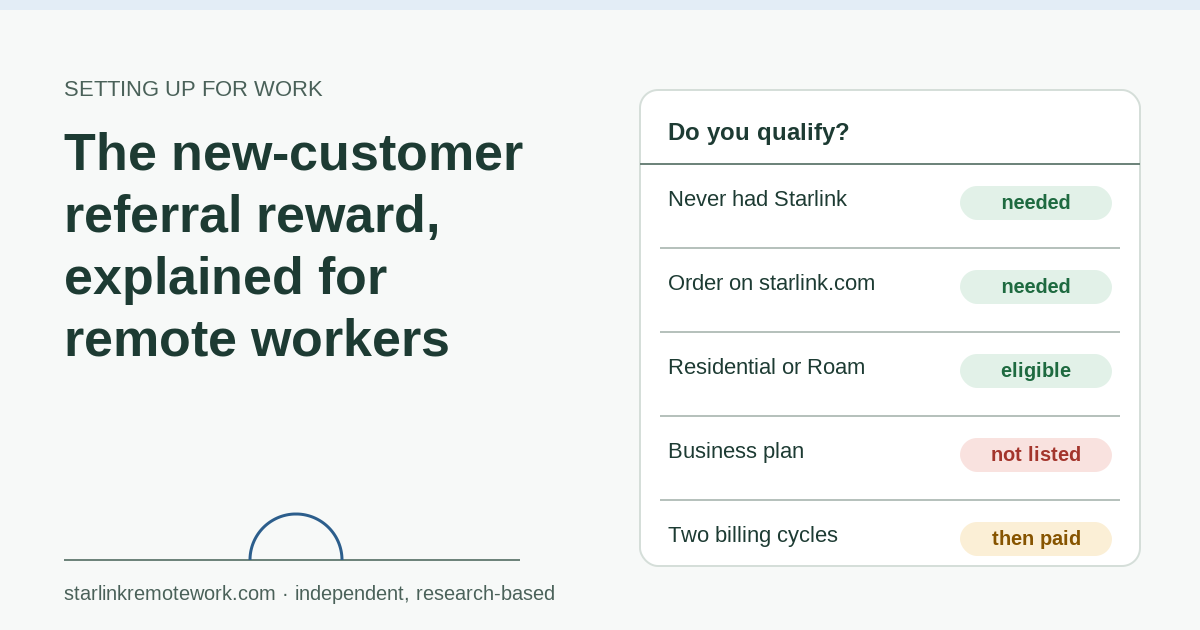
If you are new to Starlink and order on starlink.com through a customer’s referral link, Starlink gives you $100. The reward is applied to your second monthly subscription invoice, after two full monthly billing cycles on a high-speed plan; Starlink says it can come as soon as 60 days after activation. Whether that reward combines with the November discount isn’t confirmed, so don’t count on both. The details, including who qualifies, are in the referral reward for a remote-work setup.
Common mistakes when picking a plan
- Buying download speed to fix calls. Calls freeze from drops and busy-hour slowdowns, not from a lack of download.
- Ignoring the busy hour. Test at the hour your real meetings happen, with the household online as usual.
- Assuming a bigger plan fixes Wi-Fi. A laptop two rooms from the router on Wi-Fi drops packets on any plan. Run a cable to the work computer first.
- Choosing Residential when the job needs inbound access. No tier changes CGNAT.
- Skipping the backup question. If an outage costs you more than a month of service, plan a second line before you need it.
What to do next
- Check your VPN type and inbound needs with IT, using the VPN guide.
- Decide whether you need a second line with the Failover Builder.
- Then enter your address on starlink.com to see which plans and prices you get. The box below links there.
Questions people ask
Is Starlink Residential 100 Mbps enough for working from home?
For one person on video calls with a client VPN, usually yes. Starlink lists Residential 100 Mbps: download capped at 100 Mbps, upload up to 15–35 Mbps. A 1:1 Zoom call in 1080p sends about 3.8 Mbps. The risk on the cheaper tiers is slower speeds at busy hours, not a lack of bandwidth.
Is the 200 Mbps plan better for Zoom and Teams?
Not by its spec. Starlink lists the same upload range for 100 and 200 Mbps. The 200 Mbps plan helps when the rest of the household streams and downloads during your calls.
When is Residential Max worth it for remote work?
When two people are on calls at the same busy hours, when you upload large files every day, or when a dropped call costs you a client. Residential Max is the highest-network-priority Residential plan. Residential Max: download up to 400+ Mbps, upload up to 20-40 Mbps.
How much does each Starlink plan cost for a home office?
It depends on your address. In Starlink’s own price data since late October 2026: 100 Mbps $44–$55/mo depending on your address, 200 Mbps $68–$85/mo depending on your address, Max $104–$156/mo depending on your address (checked Nov 16, 2026). Your address on starlink.com shows your price and which plans are offered.
Can I start on 100 Mbps and upgrade later?
Yes. Starlink says you can upgrade or downgrade a Residential plan at any time, subject to availability, and an upgrade to Max takes effect immediately.
Do I need a business plan to work from home on Starlink?
Most remote employees don’t. You need a Priority plan if something on the internet must connect into your home (a public IP), or if heavy calling hits the CGNAT session limit. Our Residential vs Local Priority guide covers the cases.
Sources
- What are the Residential plans? (Starlink support, modified 2026-04-08), checked Nov 16, 2026
- Zoom – system requirements (Windows, macOS, Linux) KB0060748, checked Nov 16, 2026
- Microsoft Learn – Prepare your organization's network for Teams (ms.date 2026-05-26), checked Nov 16, 2026
- Google Workspace – Prepare your network for Meet meetings and live streams, checked Nov 16, 2026
- Ookla: Starlink Hits New Highs in the U.S. (published 2026-05-05, modified 2026-06-23) (secondary), checked Nov 16, 2026
- Does Starlink work with VPNs? (Starlink support), checked Nov 16, 2026
- Does the WiFi router have any ethernet (LAN) ports to connect wired devices? (Starlink support), checked Nov 16, 2026
- IP Address (Starlink support), checked Nov 16, 2026
- What are CGNAT session limits and how do they affect my connection? (Starlink support), checked Nov 16, 2026
- Starlink US marketing availability API: Residential (invitationTypeCode=1, isoCountryCode=US), checked Nov 16, 2026
- Starlink referral program (Starlink support), checked Nov 16, 2026
- Starlink Referral Program Terms, DOC-1882-84808-83 (published 2026-10-07), checked Nov 16, 2026
- Starlink help: What are the Residential plans?, retrieved Nov 16, 2026
- SatelliteInternet.com: Starlink 2026 holiday promos include up to 50% off (published 2026-11-05; quotes Starlink’s US site text), retrieved Nov 16, 2026
- Starlink help: Does Starlink have a referral program?, retrieved Nov 16, 2026
Research-based: written from vendor documentation, Starlink support pages and standards, not from our own measurements. Starlink rules and prices on this page come from our dated fact file and show the day they were checked; they change, so confirm before you rely on one.Links to Starlink’s plan pages here use the site owner’s own referral link; the owner may get a referral reward and your price is the same. No affiliate links (how we make money). General information, not professional IT, legal or medical advice. Independent · not affiliated with SpaceX or Starlink. Spotted an error? Tell us.