Starlink is open in your other tab. Here’s how to confirm the $100 referral.
Starlink opened in a new tab. On its order page, look for this green box under Checkout:
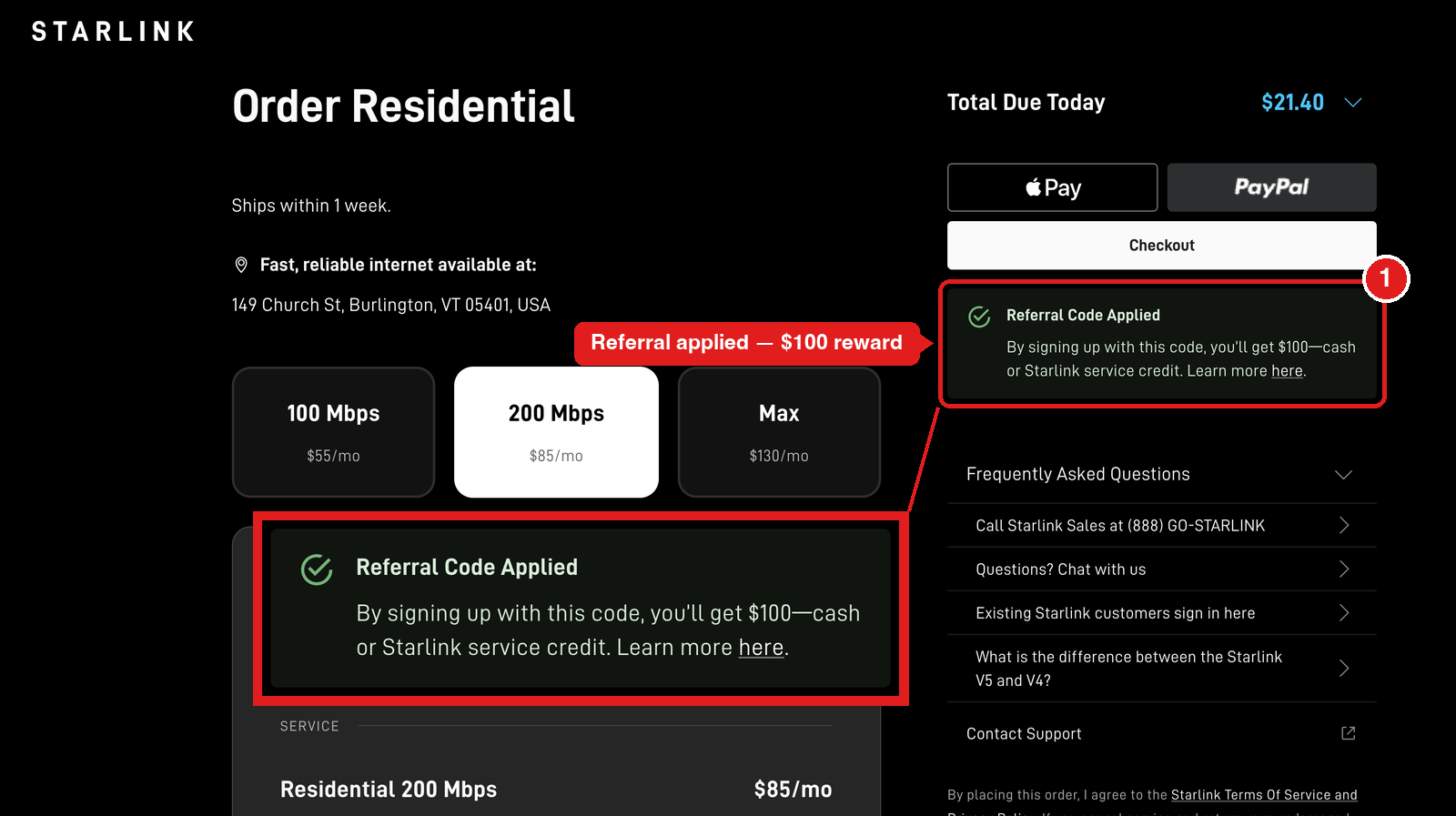
Open starlink.com again with the referralUS service addresses only
Disclosure: this button uses the site owner’s own Starlink referral link. If you order through it, Starlink may give the owner a referral reward too. Your price is the same. How we make money
You won’t see the referral on Starlink’s home page; it appears once, on the order page. Choose the plan your workday needs first, then look for that box before you pay.
Order page checked
Your referral, step by step
- Starlink tabOpenedstarlink.com is in a new tab, with the referral in its link.
- Order pageCheck nowEnter your address, pick a plan, look under Checkout.
- $100 rewardLaterApplied on your second monthly invoice, if you stay subscribed.
First, the plan your calls need
The referral works on any Residential plan, so pick on what your workday asks of the connection, not on the reward. For video calls, upload and busy-hour behavior matter more than the headline download number. Prices and specs come from Starlink’s own plan pages; our order-page screenshot on October 9, 2026 showed $85/mo for 200 Mbps at that one address. Since late October 2026 Starlink sets Residential prices by address, so the order page shows yours.
| Plan | Price | Starlink spec | Fits a workday with |
|---|---|---|---|
| Residential 100 Mbps | $44–$55/mo depending on your address | Residential 100 Mbps: download capped at 100 Mbps, upload up to 15–35 Mbps. | One person on calls, light uploads. |
| Residential 200 Mbps | $68–$85/mo depending on your address | Residential 200 Mbps: download capped at 200 Mbps, upload up to 15–35 Mbps. | Calls plus a busy house: streaming, school, a second worker. Same upload range, more download headroom. |
| Residential Max | $104–$156/mo depending on your address | Residential Max: download up to 400+ Mbps, upload up to 20-40 Mbps. | Two people on calls at peak hours, big uploads. Starlink’s highest-priority Residential plan. |
Our screenshot above uses Residential 200 Mbps because it’s the common pick for one remote worker in a household that also streams. One trade-off to know: On Residential 100 and 200 Mbps, speeds may be slower at peak hours than on Residential Max. If two of you are on calls at 10 a.m., read two remote workers on one Starlink before you choose.
From the Starlink tab to the green box
- Switch to the Starlink tab that just opened. Stay in that tab and that browser for the whole order.
- Enter your service address (a US address) and continue. Starlink checks availability there.
- Choose your Residential plan. Starlink then shows the order page with the kit, the monthly price and a Checkout button.
- Look just under the Checkout button. With the referral applied, a green box reads “Referral Code Applied”, followed by a line saying that by signing up with this code you’ll get $100, cash or Starlink service credit, and a “Learn more here” link.
- Only then fill in payment. If the green box isn’t there, stop and use the fixes below before you pay.
Two-minute check before you pay
- The plan matches your workday (calls, uploads, how many people).
- The address is where the dish will be, in the US.
- The green “Referral Code Applied” box is under Checkout.
- You’re ordering as a new customer, on starlink.com, not in a store.
- You have a backup line for call-critical days. Plan one in five questions.
Don’t see the green box?
- Reopen
Open the referral link again in the same browser with the button on this page, then repeat the address and plan steps. Close older Starlink tabs first so you don’t finish the order in the wrong one.
- Same device
Don’t switch device or app. Clicking here on your phone and ordering on your laptop, or in the Starlink app, starts a fresh visit without the referral.
- Privacy
Private windows and cookie blockers can drop the referral between pages. Try a normal window, or allow starlink.com for this order.
- Not eligible
Existing or previous Starlink customers don’t get the reward, and kits bought in a store don’t qualify. The box may not appear, or the reward may not be paid.
- Lost
Typing starlink.com by hand, or arriving from a search result, loses the referral. It only rides along in the link you clicked.
Reopen starlink.com with the referralUS service addresses only
Disclosure: the site owner’s own Starlink referral link; Starlink may reward the owner if you order. Same price for you. How we make money
The reward, in short
- $100 for a new US customer who orders on starlink.com through a referral link (Starlink’s terms, checked October 9, 2026).
- Paid after you stay subscribed for two billing cycles; Starlink applies it on the second monthly invoice.
- Account credit by default, with a cash option.
- Not for existing or previous customers, and not for store or retail purchases.
- Starlink sets the amount and rules and can change them. Your Starlink account shows what applies to you.
How the owner’s side of this works, and why it never changes our verdicts: how we make money. Site rules are in the terms of use.
Quick questions
Why doesn’t the Starlink home page say the referral worked?
Starlink only shows it once you reach the order page, after you enter a service address and choose a plan. The home page and the plan cards look the same with or without a referral. Get to the order page and look under the Checkout button.
Do I need to type a referral code anywhere?
No. The code travels inside the link that opened your Starlink tab. There is no code box to fill in. That’s also why typing starlink.com by hand, or opening it on another device, loses it.
When does the $100 show up?
Not at checkout. Under Starlink’s terms (checked October 9, 2026), a new US customer gets $100 after staying subscribed for two billing cycles; it is applied on the second monthly invoice. It arrives as account credit by default, with a cash option. Your first bill is the normal price.
Can my employer order it and still get the referral?
The reward goes to the new customer’s account that places the order on starlink.com. If your company orders through a business account, a reseller or a store, the referral rules may not apply. Ask IT who will be the account holder before anyone checks out. See when your employer pays.
I already had Starlink at an old address. Does this apply?
No. Starlink’s referral reward is for new customers. Existing and previous customers don’t qualify, and neither do kits bought in a store.